Thursday, October 11, 2007

hiatus...

well folks, i'm taking the next few weeks off from blogging on account of an inordinate amount of studying i need to do in preparation for my comprehensive exams!

i leave you with this article from Time Magazine circa 1965:

"On the other hand, scientists dream that one day a scholar will be able to quiz a regional computer by telephone from his office; whereupon the answer, perhaps from a paper by a foreign colleague, will bounce off an orbiting communications satellite first into a simultaneous translator and then on to the scholar's TV screen."

Wednesday, October 3, 2007

Identity 2.0

My god they can slap "2.0" onto the back of anything these days huh? Aren't we at 3.0 yet?! Apparently not. But this is a list of 10 Future Web trends oh, and here's 10 MORE which presumably may eventually become 3.0's in their own right. And, as always, libraries should take note!

The Semantic Web concept has been bandied about since 2001 and still makes it to the top of the list. It is a vision developed by Sir Tim Berners-Lee, the guy who ACTUALLY invented the World Wide Web:


How does/could it work exactly? I highly recommend this article as the best step by step introduction to the concept. If you know even just a tiny bit about HTML this article will walk you easily through the progression to a Semantic Web.

Now, another related concept in the top trends is Identity 2.0:

...the anticipated revolution of identity verification on the internet using emerging user-centric technologies such as the OpenID standard or Microsoft Windows CardSpace. Identity 2.0 stems from the Web 2.0 theory of the world wide web transition. Its emphasis is a simple and open method of identity transactions similar to those in the physical world, such as driver's license. Identity 2.0 Wikipedia

This is a completely entertaining introduction to the concept. You will definitely giggle and nod:


PREVIEW: Later on in the week I'll cover how these technologies can ultimately enhance library services....

Tuesday, September 25, 2007

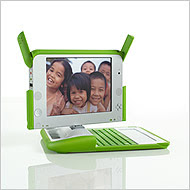
One laptop per child

THIS. this is fantastic.


MIT Media lab has done it, they've created a laptop that has the potential to bridge the digital divide and guess what is a huge part of that equation.....OPEN SOURCE SOFTWARE! freedom. sharing. love it. check this thing OUT!

“Everything in the machine is open to the hacker, so people can poke at it, change it and make it their own,” said Mr. Bender, a computer researcher. “Part of what we’re doing here is broadening the community of users, broadening the base of ideas and contributions, and that will be tremendously valuable.” (from the New York Times, Buy a Laptop for a Child, Get a Laptop)

And now they're offering a Give 1 to Get 1 program starting November 12 ending November 26...One will go to a child in a developing nation, and the other one will be shipped to you by Christmas and the whole thing is a tax-deductible charitable contribution.

if I wasn't so broke at the moment....sigh.

Sunday, September 23, 2007

which book?

don't know which book to read next?

my boyfriend, a writer, will recoil in horror at this site for its assault on the sophistication of the novel by breaking it down by simple descriptors like 'sad'...and 'happy'....and i fully expect an angry diatribe at any moment...

but hey, i'm a sucker for things that request my input! and i suspect you are too....:

whichbook

the only WEE problem for us yanks is that it pulls from a catalog of popular british titles and connects you to your local library in BRITAIN, which in my case is oh, say, 3676.653 miles away.

Sunday, September 16, 2007

VISUALIZE!!!

Yea know, when I was little and played sports I always remember my dad hollering from the sidelines: "VISUALIZE!!!" heh. He firmly believed that if I could just create a clear picture in my mind of myself hitting that ball I could wack it out of the park. God bless him. heh.

The idea of visualization is still a running theme in my life but its application has taken on a different slant. Some technophiles have taken up my father's VISUALIZE battle cry in order to answer the question:

How does one get a more clear view of all of the information connected throughout the internet?

Visualization engines. Try plugging in, say, "John Frum" and see what you get!

http://grokker.com
http://www.kartoo.com
http://touchgraph.com

Also on this point, some clever fellows have come up with an algorithm to visualize the "Power Struggle" on wikipedia. They're able to display all of the articles within wikipedia while highlighting the most revised (and thus, perhaps, contested) entries.

Monday, September 10, 2007

Quick Accessibility tips for Windows and Mac

A large part of dealing with the public in the library setting is being prepared to make information accessible to everyone at any time....

A tall order indeed!

But have no fear, here are a few quick tips that I just picked up from my Information Literacy course:

Windows XP has three little accessibility features right there under their accessories that can help out in a pinch. Go to Start/All Programs/Accessories/Accessibility and you'll find a:

  • Magnifier (enhances hard to read fonts simply by mouse-over)
  • Narrator (reads onscreen text, not exactly THAT good but an option for a patron in need)
  • On-screen keyboard (very neat, test this out! it allows you to use your mouse to click on the letters of a virtual keyboard. helps when a patron may have limited mobility)

Apple also has some pretty extensive accessibility features available under /Applications/System Preferences/Universal Access.

Among the cooler features available through Apple:


There is certainly far better (and more expensive) technology out there that makes information more easily accessible to all users in this digital age, but knowing these little tricks can be useful on the fly (and the cheap)!

Friday, September 7, 2007

Steampunk! A little somethin' for the traditionalists...

In our field, there still tends to be a perceived divide between those who yearn for the more traditional tactile times of ye ol' librarianship (think: mahogany shelves filled with antique books lit moodily by brass and copper lamps) and those who loooooove the powerful and fast tech side of things.

Well, luckily, there are some punks out there trying to marry those two concepts...and it's called steampunk!

My buddy Kathleen sent me this fantastic article about it.

Check out the steampunk monitor and keyboard.


Thursday, September 6, 2007

Ms. Dewey

HA! this is great. one of the faculty at CUA, Joan Lussky, sent this on to me. Try it out!


Thursday, August 30, 2007

Extreme Internet Searching

In class last night I picked up a few quick searching tricks for using the following engines:

www.ask.com
www.exalead.com
www.google.com
www.yahoo.com
www.live.com


Plug these little puppies into your search box and you can perform very quick and effective advanced search of the internet:

* intitle:term searches for keywords anywhere in a title (ex: intitle:brady quinn browns)
* allintitle:term searches for pages that have all words in the title (ex: allintitle:three little birds)
* inurl:term searches for keywords in url only, useful for searching government websites. (ex: inurl:.gov)
* site:term limits search to one particular website (ex: site:cua.edu)
* filetype:term limits search to specific file types, useful if you're looking for, say, a powerpoint example on a topic. (ex: information literacy filetype:ppt)


Of course these major search engines all have advanced searching capabilities which walk you through these but this is much faster once you get the hang of it!

Spamdexing

Last night in my Internet Searching and Web Design class I learned that back in the real heyday of the internet in the 1990's, spammers figured out a few tricks to get their webpages up to the top of the ranking.

Wikipedia has a great overview of Spamdexing, tricks spammers have tried to manipulate web search engines.

One in particular involved loading their pages with certain keywords because the frequency of an occurrence of a word in a page would grant that site relevancy.

Luckily search engines are more sophisticated now but what cracks me up is that spammers would put all these words in their pages but then hide them by coloring the text the same as the background. So back in the day when you searched for info on say "autos" and got a XXX site that's 'cause they secretly typed out 'autos autos autos autos' all over their webpage! heh. (which frankly you might not have even noticed even if the text WAS visible on an XXX site....)

Anyway, now engines are a lot smarter and can do things like search for color on color as well as check for too MUCH frequency of a word.

Sunday, August 26, 2007

Moodle

Information literacy is by far one of the most important elements of public librarianship and can take many forms such as teaching basic computing skills (how to use Word for instance), helping senior citizens navigate the Medicare Program website, or creating research guides for using the library.

Moodle is a "course management system designed to help educators who want to create quality online courses. The software is used all over the world by universities, schools, companies and independent teachers. Moodle is open source and completely free to use."

Perfect for the public library, no? Sadly a look through their directory comes up empty for public libraries in the US. BUT I found a pretty good example (login as a guest) put out by the 21st Century Fluency Project, which taught a course on moodle "Powersearching in a Web 2.0 World" which is essentially a perfect information literacy topic for a library to cover.

Tuesday, August 21, 2007

Baby steps to ebook reading....

E-paper is a whole new deal and it will blow your mind. It is nothing like a traditional computer screen that generates the light and screen flickering that strains our eyes. (My eyes just dried out thinking about it...) Instead, it is a flexible plastic that reflects light much like a piece of paper does. In fact, you can even write (AND erase) on it.


So we're working towards a solution for ebook readers in terms of comfort.

eReaders with the new ePaper display:
Cybook Gen3
Sony Reader
iRex Iliad

but there's still a wee problem:

NetLibrary and Overdrive (the main providers of ebooks to libraries) both wrote back to me and confirmed that at this time, they don't know of any eReaders that are compatible with their ebooks. Sigh.

This is because no one knows how to share. Each new eREADER with this fabulous technology makes it so that you have to download software that forces you to purchase books from their stores (sony uses Connect) and each PROVIDER is unwilling to remove the DRM requirements that would allow people to download their content to these eReaders.

Another problem? These eReaders are EXPENSIVE! So even if the ebooks were compatible with these flashy new devices, your average public library patron wouldn't be interested because they can't afford the nice viewing experience.

Sadly, there's a long way to go but I have a lot of faith in the trickle down theory....

Saturday, August 18, 2007

Plastic Electronics....

In library studies we spend a lot of time thinking about how we will be expected to deliver information in the future. This means that we have to start thinking NOW about how best to structure our digital info for delivery via, say, contact lenses. Heh.

Wednesday, August 15, 2007

Steve Museum: A Social Tagging Experiment

I'm in this ridiculously great course at Catholic University, Art & Museum Librarianship whereby for a week straight we visit fascinating art museums and other cultural institutions all around Washington D.C.:

The National Gallery of Art

The Smithsonian Libraries
The National Archives of American Art
The American Folklife Center
The National Museum of Women in the Arts
University of Maryland Art & Architecture Library
University of Maryland Performing Arts Library
National Museum of the American Indian
The Thomas Jefferson Foundation Library and Monticello

Anyway somewhere along the way I picked up this neat website, Steve Museum an experiment in social tagging. Anyone can participate in this ongoing research project that will help develop new ways to catalog and describe works of art through social tagging. Just sign up and flip through images of art and start describing!

"See art you haven't seen before. Look in a new way. Describe works of art in your own words. Exchange your ideas with the community of art lovers. Lead others to artworks they wouldn't normally see. Create a personal relationship to works. Let museums know what you see. The more you tag, the richer the experience for all."

Saturday, August 11, 2007

Not so Hakuna Matata: Library Internet Access in Africa

So, I was clicking through the ever so interesting ASIS&T conference presentations and came upon this little number on the emergence of internet cafe usage in Johannesburg, South Africa. The hypothesis: internet cafe's are actually used most regularly by locals (as opposed to backpackers) and are typically their primary means of access to the internet.


It got me wondering about what sort of internet access the library systems throughout South Africa (or hey, why not all of Sub Saharan Africa) have and why so many folks are flocking to pay for internet usage at cafe's instead?

Well, in the city of Johannesburg, turns out the library requires an annual membership fee of R30 a year ($4US). With internet cafe rates ranging from R5 ($0.67) to R30 an hour, it should still be far more advantageous to join the library, no? I don't get it. What's the draw for the cafe's? How is the library not able to tap into this network of eager users? Perhaps it's a capacity issue? Money? Both? I don't know. Johannesburg is no backwater...what gives?

Then you've got the oh-so-glam city of Cape Town which was awarded the Bill & Melinda Gates foundation Learning Award for their Smart Cape Access program. This program has essentially provided free public internet access at all public libraries throughout the city. Heck they've even put the internet on trucks for those hard to reach places!

And somewhere in between you've got the city of Bulawayo Public Library out in Zimbabwe which opened up its OWN cyber cafe. They charge for usage like any other internet cafe but at a much cheaper and more competitive rate and use the fees to sustain their internet access.

I think I might have to go over there and check things out for myself. Although, I can barely handle the heat here in DC right now....

Tuesday, August 7, 2007

Facetag and twentysomethings...

I'm starting to read this book that my boyfriend's grandmom got him called Twentysomething essays by Twentysomething writers. The essays were chosen as part of a Random House contest and in the note from the editors, they relate the complexity of trying to group and organize the thousands of entries they received because in the end each essay could, in one way or another, fit into each of their preconceived categories.

"The problem was that such “everything-ness” seemed to spoil any claims of twentysomething solidarity. Our generation has often been accused of political apathy, of lacking the unity of ideology and purpose that the Boomers—our parents—were so famous for. According to popular opinion, we are all supposed to be deeply polarized by the Red/Blue divide. But, in reality, the spectrum is much wider and more colorful. We are not apathetic; we’ve simply learned to make more subtle distinctions."

It's these subtle distinctions that make the finding, collocating and evaluation of information, especially on the web, extremely difficult.

FaceTag is a prototype for a new tool that combines the benefits of folksonomic tagging with faceted classification. Folksonomy tagging is the process whereby users label items with their own keywords such as the labels I use below each post on this blog, or on YouTube and Flickr. Some of the issues with tagging is that it can be inexact or overly personalized, for instance I may label this post as "fun" but you might find it to be "awful".

Faceted classification on the other hand analyzes items by distinct characteristics which can then be divided into subclasses. FaceTags facets are Resource Types, Language, Activities/Subjects, Usage, People, Date. As tags become connected to these characteristics, browsing and searching becomes richer.

Saturday, August 4, 2007

Drupal & Joomla: A cure for lousy library website design!

Fed up with frequent encounters with unnecessarily lousy websites, my friends Kristin and Marina and I started experimenting with ideas for providing good free web design help to smaller underfunded libraries. At the time we thought, hey, why not just provide free pre-designed library templates for download! The problems with this of course is that one would need to know some html and, because it doesn't solve the bigger issue of archiving content and integrating the catalog into the front end, it'd only be putting lipstick on a pig. But we were on the right track....

Drupal and Joomla, free open source content management systems, THAT'S what we were looking for! Unlike building a simple set of webpages from Dreamweaver or FrontPage, a content management system has a database structure behind it and allows you to create, store and organize all of your information. This data is then queried, uploaded into an html document and displayed as a webpage according to your template style. It allows you to set your design style and makes it extremely easy for others to go in and edit the content without needing to know any programming or html. Content management systems can run into the tens of thousands of dollars but Drupal and Joomla are free....

Drupal Examples:
There is a great overview, Building Public Library Websites with Drupal on the Library and Technology Association Blog. The Ann Arbor District Library is a perfect example of a Drupal based library website.

Joomla Examples:
For examples of Joomla based library websites check out the uber informational Joomla in Libraries site. Or, if you have a little more time, there's the Open Source Solutions for Public Libraries presentation by the Tyngsborough Public Library which includes a section on their use of Joomla.

Wednesday, August 1, 2007

Gadgets and other new fandangled technology

I attended the SLA Conference in Denver over the weekend...that is, I went through the website and tracked down all the sessions that were posted online and read them! Through the beauty of time-shifting I was able to compile this list of some of the new gadgets and technology mentioned at the conference. Some of these things have absolutely nothing to do with Library and Information Technology (see George Foreman USB i-Grill) but they're just too fun not to share....

  • Microsoft Surface: Basically a 30-inch digital table top surface with a screen that responds to touch and gestures and allows for “surface computing”. It used to exist only in 80's sci-fi movies. Now it's REAL.
  • Golan i.Tech Virtual Keyboard: Uses laser & wireless technology to project a full-size virtual keyboard onto any flat surface which then feeds into your PDA.
  • Clocky the alarm clock that runs away: It's an alarm clock that is built to “run away and hide” when you press snooze, which triggers it to start moving and eventually fall off the nightstand and keep going.
  • Cellular Book: An Italian company has developed this portable device, smaller than a cell phone, which has a thin flexible polymer display that can be unscrolled up to 5 inches. It holds ebooks, email, podcasts, music, rss feeds, etc. Will be released in Italy first and then to rest of the world.
  • George Foreman USB i-Grill: Grill meat in your office! Just plug it into the USB port of your computer, the USB port is its only power source, and through a web-based interface enter in your food item and it will be automatically grilled to perfection.
  • Eye-Fi: This is a device being tested that lets you wirelessly download your pictures from a digital camera directly to your PC. It has 1GB of memory! No more hassling with plugs and cards and lots of directions and the like. My mom in particular will appreciate this one...
  • Panasonic 103-inch Plasma TV: This is just a ginormous tv that costs $63K.
  • USB Missile Launcher: They call this "the latest weapon in office warfare technology". I like.
  • Hitachi Walkman-style Brain Scanner: Sign me up.


For more, check out Barbara Fullerton, Brian Neale and Holly Pinto's June 25th presentation 60 Gadgets in 60 Minutes.

Sunday, July 29, 2007

Don't copy that floppy! DRM fun...

This...is hilarious. I've been listening to some podcasts of presentations from the recent Special Libraries Association conference in Denver. I have a peculiar obsession with all things Digital Rights Management and also a peculiar interest in public service announcements. Lucky for me, Ed Keating, Software & Information Industry Association, brought this little gem to light in the Facets of Digital Rights Management session.

From 1992: Don't Copy That Floppy!


Also on the subject of copyright, (as an extension of DRM issues), Ed mentioned this very interesting copyright lawsuit being brought by some high-school students against a company that provides their school with anti-plagiarism services. This service, Turnitin, runs papers through a large database of student papers and journal articles to check for plagiarism. This means that student papers are being collected and archived on a large scale in databases without permission and for the company's profit. These clever students officially registered their papers with the copyright office (although, copyright registeration is no longer a requirement for protection so this is sort of unnecessary) and are now suing Turnitin thousands of dollars for violating their copyrights.

Friday, July 27, 2007

When you need a discussion board in a pinch....

Well, work on the fake storytelling website for my media class continues....and as I went back over my assignment objectives last night I realized that I had proposed to add a discussion board of some sort! Egads!

Luckily some trusty technophiles have developed free services JUST for this sort of last minute need...the shoutbox (aka chatterbox)! Ok, I admit, a shoutbox is not quite a discussion board where messages are kept in a hierarchy and replies are posted within that structure. Instead it is more like a simple open space to chat where users can post little messages and thoughts in a more linear fashion. OK, it's instant messaging.

Anyway, sifting through various shoutbox offerings on the web I settled with Shoutmix, a clever free service that allows you to add a little message box right into your website or blog.

The set up walks you through a few designs, lets you change the language and colors, and generates the html or, if y'like, flash code, that you cut and paste right into your website. The creator then has an account on the shoutmix site which allows them to moderate (ie, delete messages where necessary and set access). It also allows you to set how long messages are kept (such as, the most recent 10 and the others will be deleted).

What I love about this tool in terms of a library site is that:
  1. It can be set to not collect nor store email addresses, IP addresses, or any other identifying information. As protectors of privacy this is extremely important.
  2. It's also extremely easy for users, they just type in a name (or alias...) enter a message and click 'talk now'! There are no downloads and, unless you require a login and password, no one has to sign up for anything.
  3. There are no pop up ads or other advertisements.
  4. The free version comes with a profanity filter just in case and a spam blocker. And if you're truly concerned, the premium version offers more robust features such as the ability to make it a members only message board, etc.
I know, this idea strikes terror in the hearts of many who fear the abuse of such an open feature. Would it make you feel better if I showed you an example of it on a REAL library website? Check out how the wee Hominy Public Library in Oklahoma has put it to use. It's a shortcut for sure, on the way to establishing a more rich discussion forum, but it can work in a pinch!